
AutoCount API Integration Malaysia
Connect Odoo, web apps, mobile apps and partner systems to AutoCount Accounting through a secure JSON / REST gateway with per-customer HTTPS routing and subscription control.
Sends structured data payloads (JSON) directly to the API endpoint.
Checks data mapping, required fields, and authenticates security tokens.
Data is securely posted, updated, or synchronized into your database.
External system instantly receives a success JSON log and confirmation.
See how the SL AutoCount API Secure Gateway connects external systems, web apps, mobile apps, and partner platforms to AutoCount.
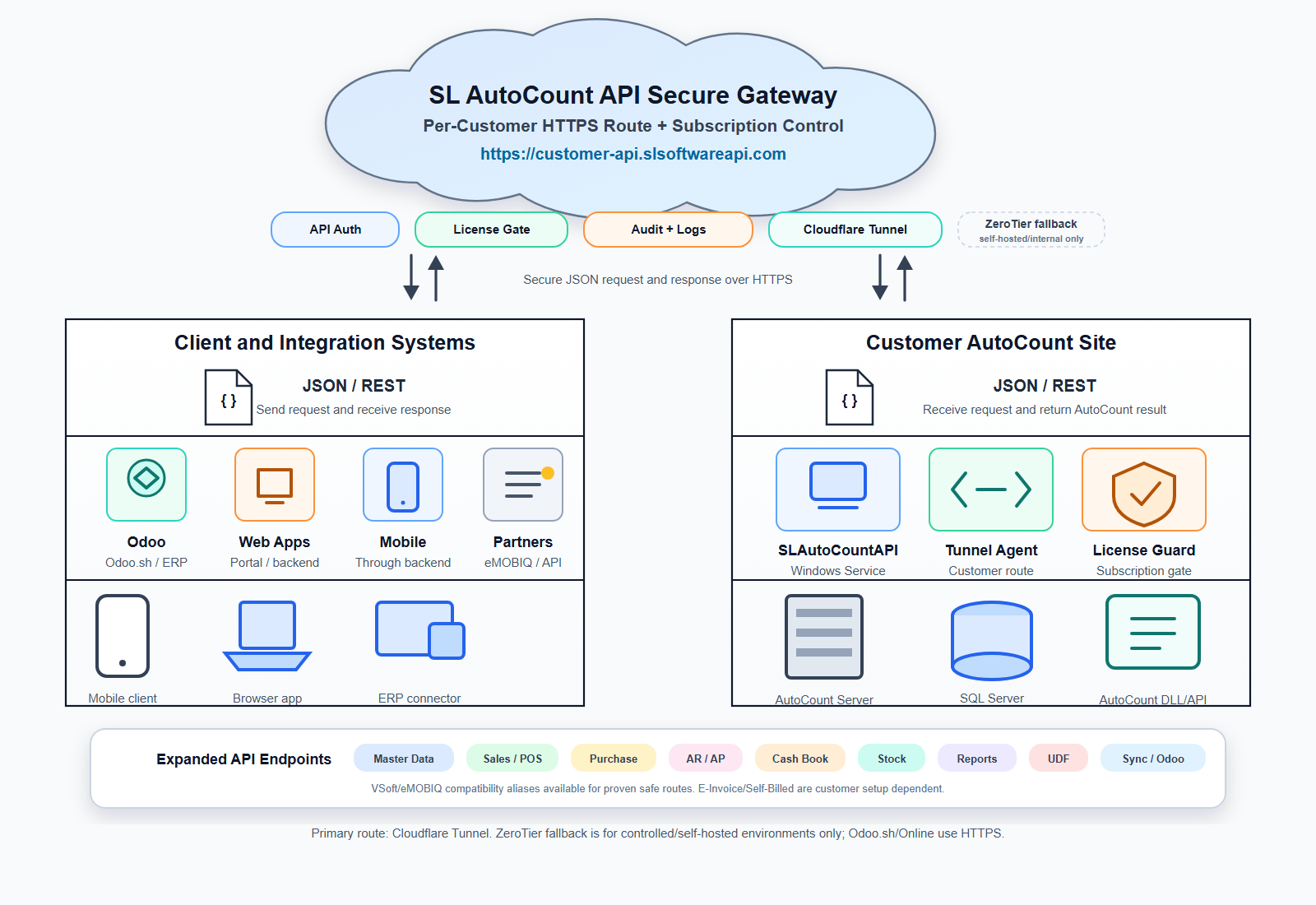
AutoCount API Integration Solution
Ready to test the connection? Access our comprehensive Postman documentation for endpoints like Stock Adjustments, or log directly into our Apache Guacamole demo server to see the API interact with AutoCount in real-time.
Includes detailed GET, POST, PUT, and DELETE methods.
API Authentication
Every API request should include valid authentication credentials in the request header. Requests without valid credentials will be rejected automatically.
Authorization: Bearer YOUR_ACCESS_TOKEN
X-SL-API-Key: YOUR_API_KEY
Content-Type: application/json
Accept: application/json| Header | Purpose |
|---|---|
| Authorization | Bearer token used to authenticate the API request. |
| X-SL-API-Key | Unique API key issued for your company, application, or integration project. |
| Content-Type | Use application/json when sending JSON request body. |
| Accept | Use application/json to receive JSON response format. |
API access is not publicly open. Developers must request demo credentials or production credentials before testing the gateway.
API credentials can be configured based on the approved integration scope. For example, one system may only read item data, while another system may be allowed to create invoices or post stock adjustments.
Retrieve item master data and item details.
Retrieve customer account information.
Create or update sales documents.
Check stock balances and stock information.
Create stock adjustments or stock transactions.
Access approved reports and enquiry data.
Example request to retrieve item master data from the demo API server.
curl -X GET "https://sldemo.slsoftwareapi.com/api/v1/items" \
  -H "Authorization: Bearer YOUR_ACCESS_TOKEN" \
  -H "X-SL-API-Key: YOUR_API_KEY" \
  -H "Content-Type: application/json" \
-H "Accept: application/json"Example response when an API token is missing, expired, or invalid.
{
  "success": false,
  "error": {
    "code": 401,
    "message": "Unauthorized. Invalid or missing authentication credentials."
  }
}
Developer quick start
| Method | Endpoint | Description | Permission |
|---|---|---|---|
| GET | /api/v1/items | Retrieve item master list. | Item Read |
| GET | /api/v1/items/{itemCode} | Retrieve item details by item code. | Item Read |
| POST | /api/v1/sales/invoices | Create sales invoice in AutoCount. | Invoice Create |
| GET | /api/v1/sales/invoices/{docNo} | Retrieve invoice by document number. | Invoice Read |
| POST | /api/v1/stock/adjustments | Create stock adjustment transaction. | Stock Adjustment Create |
| GET | /api/v1/customers/{customerCode} | Retrieve customer account details. | Customer Read |
| POST | /api/v1/sync/odoo/invoice | Sync invoice from Odoo to AutoCount. | Odoo Sync |
Control who can call the API using authentication keys and secured HTTPS request routes.
Enable subscription-based access so each customer route can be managed, renewed or disabled when needed.
Keep request and response records for troubleshooting, monitoring and integration support.
Primary route for customer API access, reducing the need to expose the local AutoCount environment directly.
Send, receive, create, update and retrieve AutoCount data using standard JSON request and response format.
Designed for implementation support, developer testing and customer-specific integration setup.
Master Data
Sales / POS
Reports
Purchase
AR / AP
Cash Book
Stock
UDF
Sync / Odoo
Connect Odoo or another ERP platform to AutoCount for customer, item, invoice, stock and transaction synchronization.
Let customer portals, ecommerce backends or internal web apps read and submit AutoCount documents securely.
Support mobile ordering, salesperson tools or operation apps through a backend-to-API integration flow.
Important information for developers, integration partners and customers who are testing SL AutoCount Web API Secure Gateway.
5-JUNE-2026
BASE URL – https://sldemo.slsoftwareapi.com/
SL AutoCount API Secure Gateway is a secure API layer that allows external systems to connect with AutoCount Accounting using JSON/REST API requests.
Yes. A website or e-commerce platform can use the API gateway to send orders, retrieve product information, check stock availability, or create sales documents in AutoCount, depending on the approved endpoint scope.
API access is protected using authentication credentials such as an API key, access token, or customer-specific security header. The exact authentication method will be provided after the integration scope and demo access are confirmed.
Yes. Developers can use the Postman collection for testing and request the confirmed base URL, token and environment details from SL Software Solutions.
Talk to our API consultant and get your integration scope checked.”